The Interactive Brokers account statement, called Statement in the Client Portal, contains all executions, dividends, interest, fees, deposits and withdrawals, corporate actions and option exercises, assignments and expiries for a freely chosen period. Downloaded as CSV it is the only way to bring history older than 365 days into the journal, because the Activity Flex Query reaches back one year only.
The export is only needed if your account is older than a year and you want to evaluate the whole history. For everything within the last 365 days the Flex Web Service is the simpler route. The distinction from a Flex Query CSV matters: the Account Statement has a different layout than the CSV export of a Flex Query and journal software usually expects exactly the Account Statement format.
Step by step
The Client Portal screenshots show the German interface. The English interface has the same layout and the labels are given in English in the text.
-
1
Open the Client Portal
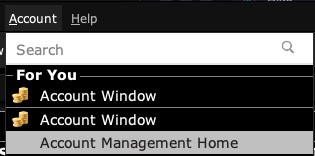
In the TWS via Account, then Account Management Home, or log in directly to the IBKR Client Portal in the browser. With introducing brokers such as CapTrader or LYNX the account login leads to the same portal.
-
2
Go to Statements
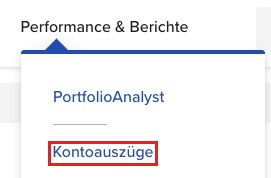
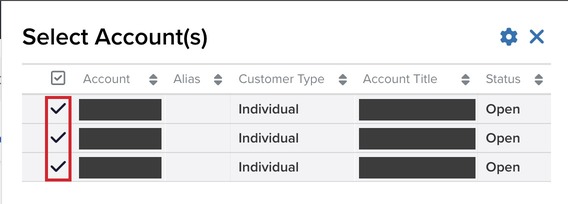
Under Performance & Reports choose Statements. If you have several accounts, select all of them or only those whose data should go into the journal.
-
3
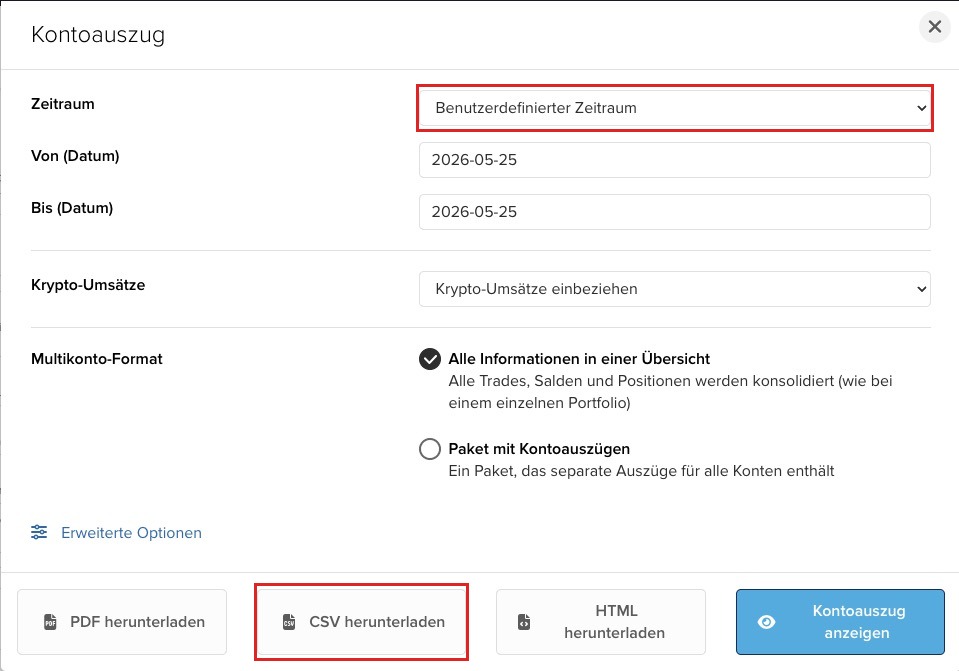
Choose the statement with a custom period
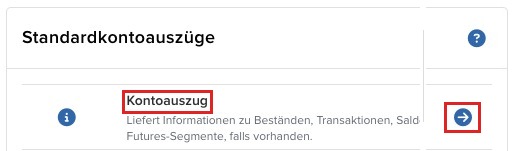
Under Default Statements choose Statement, then Custom Date Range. The portal limits one export to 365 days, for a longer history you need several files.
-
Enter the period, for example 01.01.2024 to 31.12.2024.
-
Choose the CSV format and click Download CSV.
-
Repeat for every further year until the history is complete. Overlapping periods are harmless if the software detects duplicates.
-
-
4
Import in chronological order
Import the files into the journal software, always the oldest first. Matching executions to trades builds on what came before: a sale in the second year belongs to the purchase from the first. Reverse the order and the journal may contain faulty entries when the purchase and sale of a position cannot be matched correctly.
-
5
Continue with the Flex Web Service
After the history import, the Activity Flex Query takes over the last 365 days and the Trade Confirmation Query the current day. Overlaps between CSV and Flex are unproblematic as long as the software identifies every execution uniquely and thus detects duplicates.
Worth knowing
- Do not use the CSV export of a Flex Query. It has a different layout and journal software usually reads no trades from it. Flex Queries are fetched through the Flex Web Service, not as a file.
- The German interface of the Client Portal produces a statement with German column headers. Not every software reads both variants.
- Every execution in the statement carries IBKR codes such as O (opening), C (closing), Ep (expired) or A (assigned). They show how IBKR booked the execution.
- Timestamps in the statement are in the account's time zone, not in US Eastern time as with Flex.
Frequently asked questions
Why does IBKR limit the statement to 365 days?
The Client Portal generates statements for at most one year per request. Longer histories are downloaded as several files and imported one after the other.
What if CSV and Flex import overlap?
Software that identifies every execution uniquely skips the duplicate. A period may therefore appear in both sources.
Is the statement alone enough, without the Flex Web Service?
For a one-off evaluation, yes. For an ongoing journal the manual export becomes tedious, the Flex Web Service fetches the last 365 days and the current day automatically.
Does this work with a paper trading account?
Yes. Paper accounts have no Flex Web Service, so the statement as CSV and the TWS API are the import routes there.