The Trader Workstation and the IB Gateway from Interactive Brokers offer a local programming interface: an application on the same machine connects to a socket port and queries executions, positions, account values and market data through it. The connection never leaves the machine, the TWS itself talks to the IBKR servers.
By default the API is switched off. Enabling it is a one-time setting in the TWS that survives updates. The API can only be used while the TWS is running. For daily import without the TWS there is the Flex Web Service, the TWS API is the route for real-time data, quotes and paper trading accounts.
Step by step
-
1
Open the global configuration
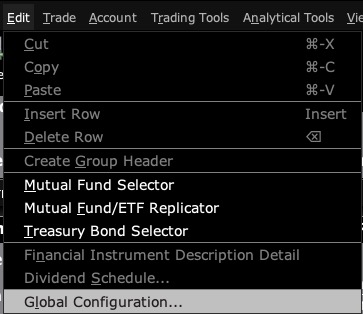
In the TWS open the Edit menu, then Global Configuration. In the IB Gateway the path is Configure, Settings.
-
2
Go to the API settings
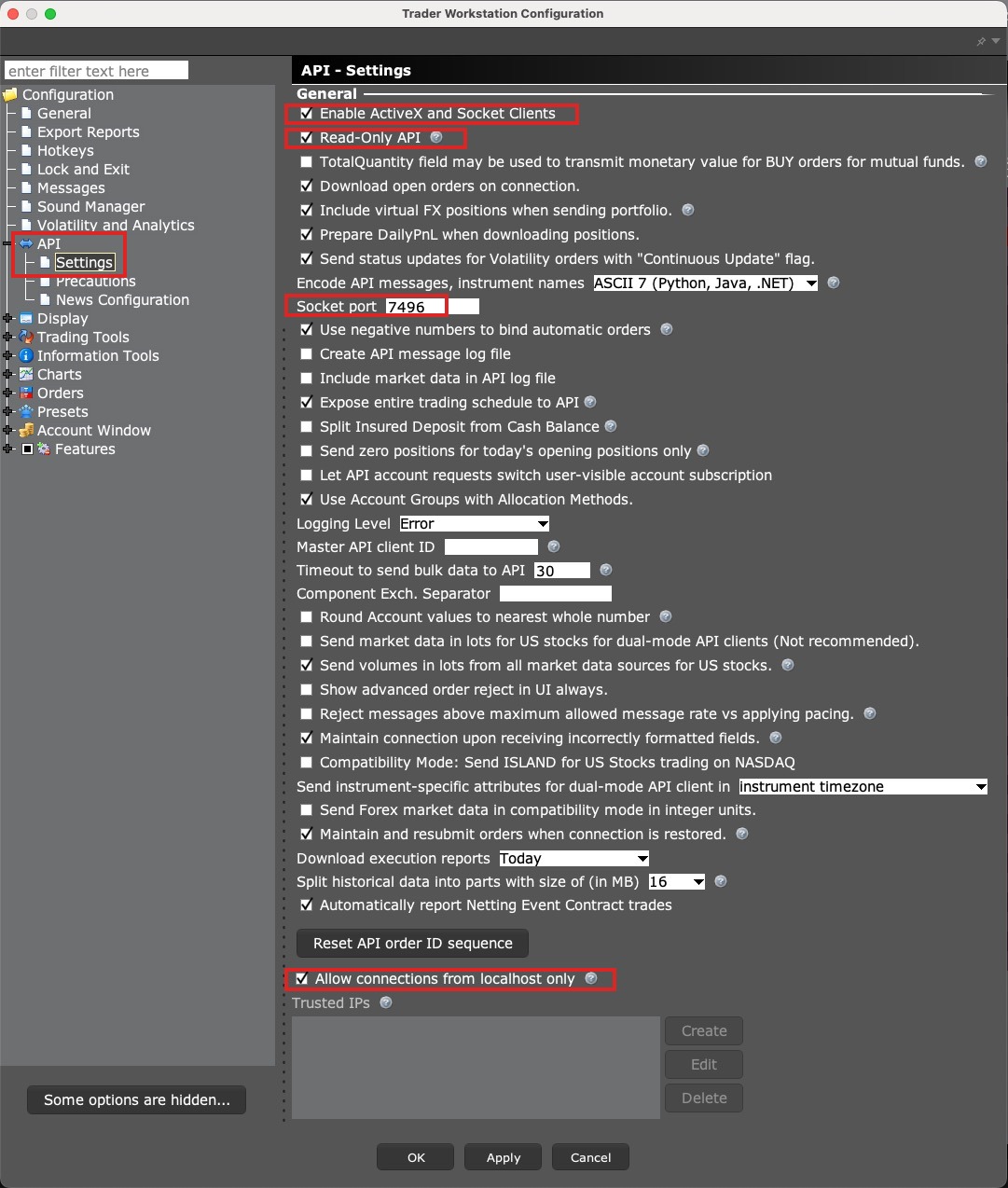
In the left column choose API, then Settings. This is where all options for connections from third-party applications live.
-
3
Allow the connection
Set these options:
-
Enable ActiveX and Socket Clients: check it. Without this box the TWS accepts no connection.
-
Read-Only API: leave it checked (default). Journal software only reads, it never places orders.
-
Socket port: the default is 7496 for live accounts and 7497 for paper trading. Enter the same port in the software.
-
Allow connections from localhost only: leave it checked (default). Only applications on the same machine may connect.
-
Send API messages in English: check it if the TWS runs in another language. The option is only visible then.
-
-
4
Apply and test the connection
Confirm with Apply and OK. On the first connection of a software the TWS shows a dialog in which you allow the connection. If you add 127.0.0.1 to Trusted IP Addresses, the dialog no longer appears.
-
5
Mind the Client ID
Every application connected to the TWS at the same time needs its own Client ID. If another tool uses the API alongside the journal, the ids must not overlap, otherwise one of the connections is rejected.
Worth knowing
- The API delivers only while the TWS or the Gateway is running and logged in.
- Market data through the API requires the matching market data subscriptions in the IBKR account. Without a subscription quotes are delayed or missing.
- Paper trading accounts have no Flex Web Service. For them the TWS API or the CSV import is the only import route.
- On macOS with Apple Silicon some TWS versions crash when windows are moved. The setting os_titlebar=false in the file jts.ini inside the Jts folder works around it.
Frequently asked questions
Can software place orders in my account through the API?
Only if Read-Only API is switched off. With Read-Only enabled the TWS delivers data only and rejects every order attempt. For a journal, Read-Only is sufficient.
TWS or IB Gateway?
Both offer the same API. The Gateway uses less memory and has no trading interface, the TWS shows charts and orders. For a journal it makes no difference. If you trade in the TWS anyway, use the TWS.
Which port is right?
7496 for live accounts, 7497 for paper trading, the TWS defaults. The IB Gateway uses 4001 and 4002. The port in the software has to match the one in the TWS.
Does the TWS API work with introducing brokers such as CapTrader or LYNX?
Yes. Introducing brokers on IBKR infrastructure provide the same Trader Workstation, the settings are identical.