At a glance
What: Foliograph shows how much margin each open trade binds, meaning how much the account margin would drop if it were closed, and tracks the value over time.
How: Four times a day TWS uses a what-if order that would close the trade to check how the margin would change. The order is only evaluated, never executed.
Requires: TWS is running and its Read-Only API option is switched off.
Default: Off. You have to enable the margin query deliberately and can switch it off at any time.
The TWS API reports margin only for the whole account. How much of it belongs to a single trade TWS can only tell through a what-if order: Foliograph asks "How would the margin change if I closed this trade?" and TWS answers with the margin before and after the order without executing anything.
Is this a security risk?
In short: Foliograph places no order for the margin measurement. The TWS setting does not only affect Foliograph though, so it is worth understanding.
What Foliograph ensures
- Foliograph places no order here. The connection used for the margin measurement blocks the order function in code and an automated test makes sure no order function is called anywhere in Foliograph.
- All other Foliograph connections to TWS (prices, executions, account) keep running in read-only mode.
- Before the measurement sends a what-if order, Foliograph checks whether TWS is read-only. If it is, the run stops before any request goes out.
What changes in TWS
The Read-Only API option is one switch for every program that connects to TWS through the API. With the API's write protection switched off, TWS accepts orders from any API program that is allowed to connect. Who may connect is governed by a second option:
- Allow connections from localhost only (on by default in TWS): only programs on your own computer can connect. Keep this option on.
- Trusted IPs: if a whole network is listed there (for example 192.168.1.0/24), devices from that network may connect too. Only list addresses you know, or leave the list empty.
What this means in practice
- If you use no API programs besides Foliograph and only localhost is allowed, only software on your computer can send orders. Malware on your computer could operate TWS through its user interface anyway, the API setting changes little about that.
- If you use other API programs (your own scripts, other trading tools), they can send orders with the option off. With such tools that is usually intended anyway.
- If you prefer to keep the option on, leave the measurement off. Everything else in Foliograph works unchanged, including the margin reserve of the whole account in the Portfolio key figures.
More on every connection Foliograph makes is under Security and privacy.
Switching it on in three steps
1. TWS: switch off Read-Only API
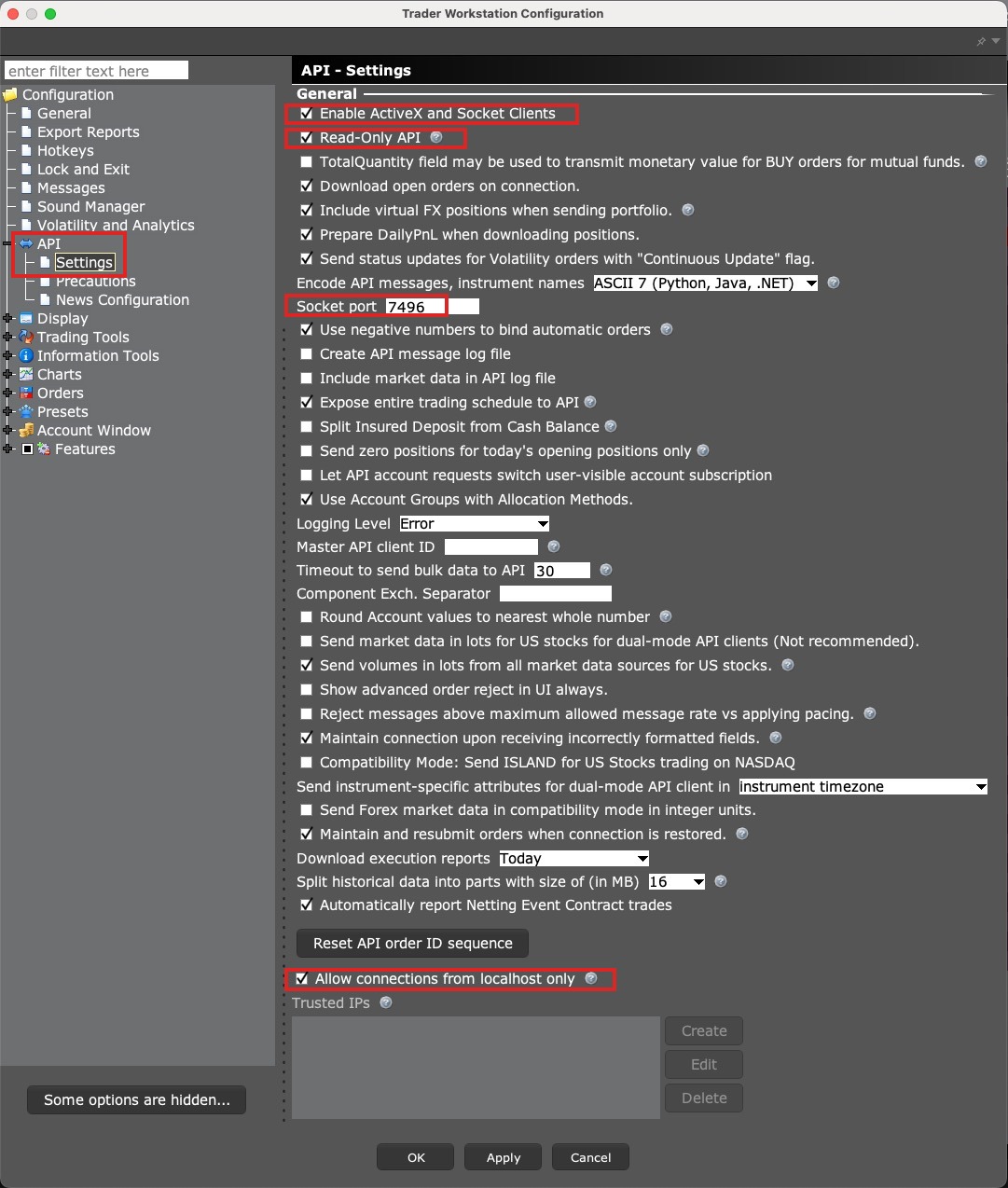
In TWS: Edit > Global Configuration > API > Settings. Clear the Read-Only API checkbox and keep Allow connections from localhost only checked. Save with Apply and OK.
2. Foliograph: switch the measurement on
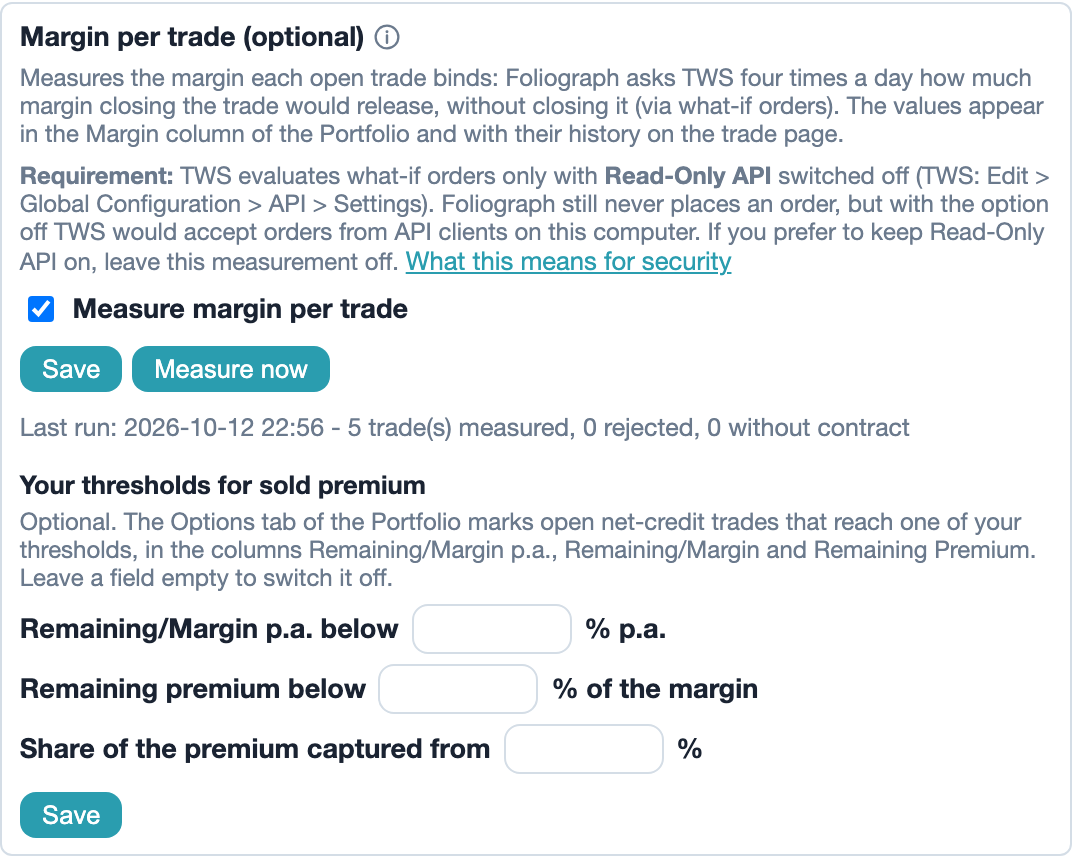
Under Settings > Connections > Margin per trade (optional) check Measure margin per trade and click Save. Foliograph then shows the Margin column in the Portfolio list.
3. First measurement
The first measurement runs within six hours while TWS is running. Measure now starts it right away. Below the switch you then see when the last run was and how many trades were measured.
Where the values appear
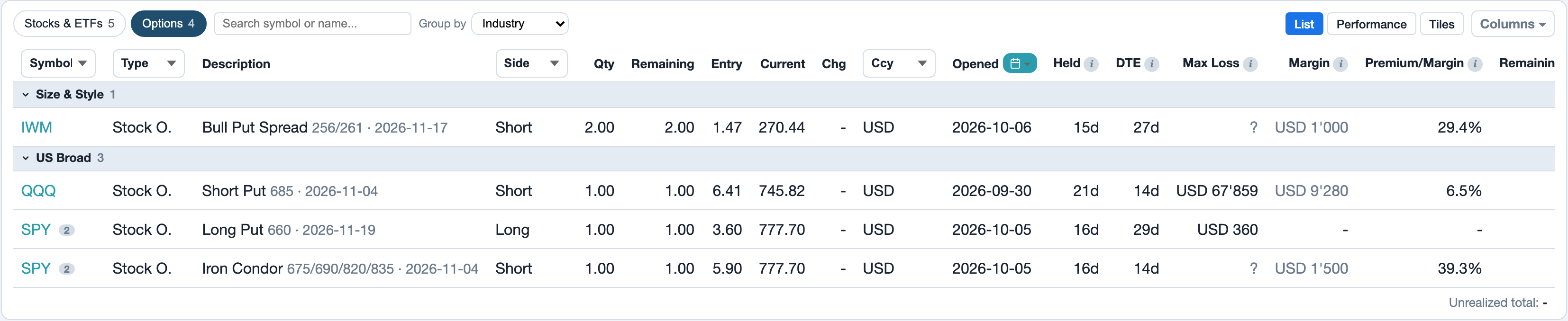
- Portfolio: the Margin column shows the newest value per trade. The tooltip names maintenance margin, initial margin and date. A muted value is from an earlier day. The Allocation tab counts the bound capital with these values.
- Trade page: a small curve shows the margin over the trade's life.

- Journal: the Columns button can show the highest measured Margin and Init. Margin of each trade. The Total row below the table adds both up over every filtered trade, across all pages.
Foliograph keeps one value per trade and day, in the account's base currency.
Premium against margin
Option trades with a net credit get further columns. All are off by default and can be shown with Columns.
| Column | Meaning |
|---|---|
| Premium/Margin | Sold premium in percent of the maintenance margin at opening (first value measured) |
| Remaining Premium | What buying the open contracts back would cost today |
| Remaining/Margin | Remaining premium in percent of the current margin |
| Remaining/Margin p.a. | The same ratio, annualized over the days to expiry |
Example: 500 premium on 2'500 margin at opening is 20% Premium/Margin. If 100 of remaining premium is left later on the same margin, that is 4% Remaining/Margin. With 10 days to expiry this annualizes to about 146% p.a.
Remaining/Margin p.a. is a theoretical rate assuming the options expire worthless and the margin stays unchanged. It is not a return.
Your own thresholds
Under Settings > Connections you can set your own thresholds: Remaining/Margin p.a. below X%, a remaining premium below X% of the margin or a captured share of the premium from X%. Rows that reach a threshold are marked in the positions list of the Portfolio (Options chip) and listed in the Premiums & risk tab. The fields stay empty until you enter values yourself. Foliograph sets no values of its own.
How it is measured
- Spreads are one trade in the journal and go to TWS as one combo order. Measured leg by leg, the short leg would count as uncovered.
- Covered positions: a stock and the option it covers are measured together. Both trades show the pair's value.
- Remaining premium: the same session reads the current value of the open contracts from the TWS portfolio.
Limits
- Each trade is measured as if only it were closed. Offsets between different trades, e.g. a long put held as a separate hedge, are not attributed to any trade.
- Under Reg T the sum of all trades usually comes close to the account margin. Under Portfolio Margin the values can differ more, because IBKR assesses the whole account together there.
- Measurements only run while TWS is running. A Flex Query delivers no margin.
Troubleshooting
| What you see | Cause and fix |
|---|---|
| Red note "TWS answered in read-only mode" | Read-Only API is still on in TWS. Switch it off, then click Save again under Settings > Connections. |
| "Last run failed" | TWS was not reachable or refused the connection. Check that TWS is running and the port is right. |
| Question mark in the Margin column | TWS did not accept the combo or the contract has expired. The tooltip names the reason. |
| No values for Premium/Margin | These columns exist only for option trades with a net credit and only after the first measurement. |
Switching it off
Clear the checkbox under Settings > Connections and save. The values measured so far are kept. You can then switch Read-Only API back on in TWS.
Related
This page is also in the app under Help, in the language of the interface. Question not answered? Write to info@foliograph.ch or use the contact form.